It's embarrassing really, soon after creating my Android-Image-Cropper fork as I wrote about in my previous post, a GitHub user noted that I have a slowness issue caused by loading/decoding image URI on main thread potentially causing an ANR, really a newbie mistake.
Unfortunately starting a new startup I didn't have the time to fix it then, and no one come forward with a pull request. Fortunately the company is more mature now so I can commit a bit of my free time for the project.
What we will have here:
- A few words on the implementation.
- Using
setImageUriAsyncandgetCroppedImageAsync. - Handling
OnSetImageUriCompleteandOnGetCroppedImageCompletelisteners. - Overriding default progress bar UI using
showProgressBarview attribute and listeners.
TL;DR See the gist.
Under the hood
The asynchronous implementation is a relatively simple one based on Processing Bitmaps Off the UI Thread article with some adjustments to concurrency and cancelation handling.
Bottom line:
- Using AsyncTask with all the good and bad that comes with it, so probably one single background thread executing each request serially, though bitmap processing should be fast so this won't be an issue.
- No cancelation of running asynchronous loading or cropping – after quick look it doesn't look possible.
- Using WeakReference everywhere to prevent memory leaks in android lifecycle.
- Using instant state to handle rotation during asynchronous loading to restart the operation.
Using asynchronous set/crop method and on-complete listeners
Using setImageUriAsync asynchronous API is as simple as using setImageUri, as it will set the loaded image to the image view as soon as it is loaded, except if an error occurred you won’t get exception thrown but need to subscribe a listener using setOnSetImageUriCompleteListener that provided the error as parameter.
The same mechanism is used for getCroppedImageAsync where both successful and failed result are received via listener subscribed by setOnGetCroppedImageCompleteListener.
Another thing worth mentioning is that subscribing and unsubscribing should be done in activity onStart and onStop methods respectively to prevent code execution on irrelevant widgets due to android lifecycle.
@Override
protected void  onStart() {
    super.onStart();
    mCropImageView.setOnSetImageUriCompleteListener(this);
    mCropImageView.setOnGetCroppedImageCompleteListener(this);
}

@Override
protected void  onStop() {
    super.onStop();
    mCropImageView.setOnSetImageUriCompleteListener(null);
    mCropImageView.setOnGetCroppedImageCompleteListener(null);
}
Overriding default progress bar UI
By default the a simple progress bar will be shown in the center of the cropper widget (figure 1).
It will be shown, using the default color scheme of the project, when image is set and cropped using asynchronous methods (async suffix).

Figure 1: Default progress bar UI, small progress bar widget center to cropper view.
To change the default, first we need to disable it using showProgressBar="false" custom attribute. Then we add our custom widgets as sibling to CropImageView and adding FrameLayout as parent so our custom progress UI can be center and on top of the cropper widget.
<FrameLayout
    android:layout_width="match_parent"
    android:layout_height="0dp"
    android:layout_weight="1">

    <com.theartofdev.edmodo.cropper.CropImageView
        android:id="@+id/CropImageView"
        android:layout_width="match_parent"
        android:layout_height="match_parent"
        app:cropShowProgressBar="false"/>

    <!-- <color  name="color">#99EEEEEE</color> (in styles.xml) -->
    <LinearLayout
        android:id="@+id/ProgressView"
        android:layout_width="match_parent"
        android:layout_height="wrap_content"
        android:layout_gravity="center_vertical"
        android:background="@color/color"
        android:orientation="vertical"
        android:visibility="invisible">

        <TextView
            android:id="@+id/ProgressViewText"
            android:layout_width="wrap_content"
            android:layout_height="wrap_content"
            android:layout_gravity="center"
            android:textSize="24dp"/>

        <ProgressBar
            style="@style/Widget.AppCompat.ProgressBar.Horizontal"
            android:layout_width="match_parent"
            android:layout_height="wrap_content"
            android:layout_margin="10dp"
            android:indeterminate="true"/>
    </LinearLayout>
</FrameLayout>
Next we need to show our custom UI before starting asynchronous operation and hide it when it completes by using listeners.
@Override
protected void  onActivityResult(int requestCode, int resultCode, Intent data) {
    if (resultCode == Activity.RESULT_OK) {
        Uri imageUri = CropImage.getPickImageResultUri(this, data);
        mCropImageView.setImageUriAsync(imageUri);
        mProgressViewText.setText("Loading...");
        mProgressView.setVisibility(View.VISIBLE);
    }
}

public void  onCropImageClick(View view) {
    mCropImageView.getCroppedImageAsync();
    mProgressViewText.setText("Cropping...");
    mProgressView.setVisibility(View.VISIBLE);
}

@Override
public void  onSetImageUriComplete(CropImageView cropImageView, Uri uri, Exception error) {
    mProgressView.setVisibility(View.INVISIBLE);
    if (error != null) {
        Log.e("Crop", "Failed to  load image for cropping", error);
        Toast.makeText(this, "Something  went wrong, try again", Toast.LENGTH_LONG).show();
    }
}

@Override
public void  onGetCroppedImageComplete(CropImageView view, Bitmap bitmap, Exception error) {
    mProgressView.setVisibility(View.INVISIBLE);
    if (error == null) {
        if (bitmap != null) {
            mCropImageView.setImageBitmap(bitmap);
        }
    } else {
        Log.e("Crop", "Failed to  crop image", error);
        Toast.makeText(this, "Something  went wrong, try again", Toast.LENGTH_LONG).show();
    }
}
Result:
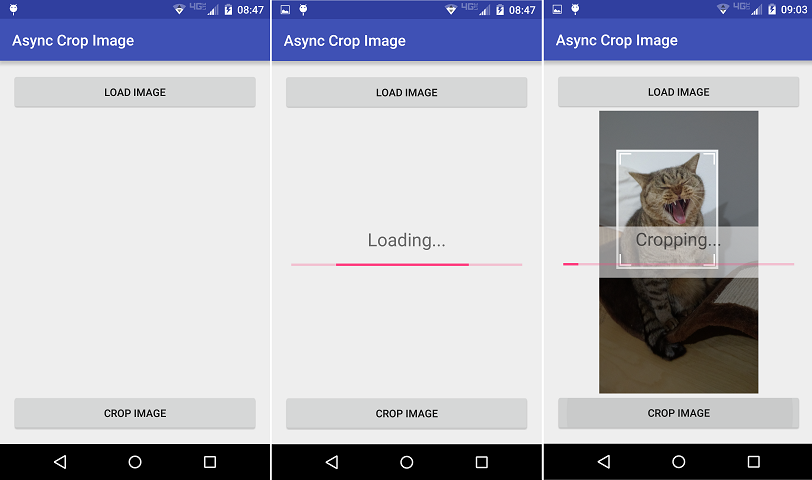
Figure 2: Custom progress bar UI, horizontal progress bar with text with fade background over cropper view.
Code
public class  MainActivity extends AppCompatActivity implements  CropImageView.OnGetCroppedImageCompleteListener,  CropImageView.OnSetImageUriCompleteListener {

    private CropImageView mCropImageView;

    private View mProgressView;

    private Uri mCropImageUri;

    private TextView mProgressViewText;

    @Override
    protected void onCreate(Bundle  savedInstanceState) {
        super.onCreate(savedInstanceState);
        setContentView(R.layout.activity_main);
        mCropImageView = (CropImageView)  findViewById(R.id.CropImageView);
        mProgressView =  findViewById(R.id.ProgressView);
        mProgressViewText = (TextView)  findViewById(R.id.ProgressViewText);
    }

    @Override
    protected void onStart() {
        super.onStart();
        mCropImageView.setOnSetImageUriCompleteListener(this);
        mCropImageView.setOnGetCroppedImageCompleteListener(this);
    }

    @Override
    protected void onStop() {
        super.onStop();
        mCropImageView.setOnSetImageUriCompleteListener(null);
        mCropImageView.setOnGetCroppedImageCompleteListener(null);
    }

    public void onLoadImageClick(View view) {
        CropImage.startPickImageActivity(this);
    }

    public void onCropImageClick(View view) {
        mCropImageView.getCroppedImageAsync(mCropImageView.getCropShape(), 500,  500);
        mProgressViewText.setText("Cropping...");
        mProgressView.setVisibility(View.VISIBLE);

    }

    @Override
    public void  onSetImageUriComplete(CropImageView cropImageView, Uri uri, Exception error) {
        mProgressView.setVisibility(View.INVISIBLE);
        if (error != null) {
            Log.e("Crop",  "Failed to load image for cropping", error);
            Toast.makeText(this,  "Something went wrong, try again", Toast.LENGTH_LONG).show();
        }
    }

    @Override
    public void  onGetCroppedImageComplete(CropImageView view, Bitmap bitmap, Exception error) {
        mProgressView.setVisibility(View.INVISIBLE);
        if (error == null) {
            if (bitmap != null) {
                mCropImageView.setImageBitmap(bitmap);
            }
        } else {
            Log.e("Crop",  "Failed to crop image", error);
            Toast.makeText(this,  "Something went wrong, try again", Toast.LENGTH_LONG).show();
        }
    }

    @Override
    protected void onActivityResult(int  requestCode, int resultCode, Intent data) {
        if (resultCode == Activity.RESULT_OK) {
            Uri imageUri = CropImage.getPickImageResultUri(this, data);

            // For API >= 23 we need to check specifically that we have permissions to read external storage,
            // but we don't know if we need to for the URI so the simplest is to try open the stream and see if we get error.
            boolean requirePermissions = false;
            if (CropImage.isReadExternalStoragePermissionsRequired(this, imageUri)) {

                // request permissions and handle the result in onRequestPermissionsResult()
                requirePermissions = true;
                mCropImageUri = imageUri;
                requestPermissions(new String[]{Manifest.permission.READ_EXTERNAL_STORAGE}, 0);
            }

            if (!requirePermissions) {
                mCropImageView.setImageUriAsync(imageUri);
                mProgressViewText.setText("Loading...");
                mProgressView.setVisibility(View.VISIBLE);
            }
        }
    }

    @Override
    public void onRequestPermissionsResult(int requestCode, String permissions[], int[] grantResults) {
        if (mCropImageUri != null && grantResults.length > 0 && grantResults[0] == PackageManager.PERMISSION_GRANTED) {
            mCropImageView.setImageUriAsync(mCropImageUri);
            mProgressViewText.setText("Loading...");
            mProgressView.setVisibility(View.VISIBLE);
        } else {
            Toast.makeText(this, "Required permissions are not granted", Toast.LENGTH_LONG).show();
        }
    }
}
<?xml  version="1.0" encoding="utf-8"?>
<LinearLayout
    xmlns:android="http://schemas.android.com/apk/res/android"
    xmlns:app="http://schemas.android.com/apk/res-auto"
    xmlns:tools="http://schemas.android.com/tools"
    android:layout_width="match_parent"
    android:layout_height="match_parent"
    android:orientation="vertical"
    android:paddingBottom="@dimen/activity_vertical_margin"
    android:paddingLeft="@dimen/activity_horizontal_margin"
    android:paddingRight="@dimen/activity_horizontal_margin"
    android:paddingTop="@dimen/activity_vertical_margin"
    tools:context="com.example.arthu.testandroidcropper.MainActivity">

    <Button
        android:layout_width="match_parent"
        android:layout_height="wrap_content"
        android:onClick="onLoadImageClick"
        android:padding="@dimen/activity_horizontal_margin"
        android:text="Load  Image"/>

    <FrameLayout
        android:layout_width="match_parent"
        android:layout_height="0dp"
        android:layout_weight="1">

        <com.theartofdev.edmodo.cropper.CropImageView
            android:id="@+id/CropImageView"
            android:layout_width="match_parent"
            android:layout_height="match_parent"
            app:cropShowProgressBar="false"/>

        <!-- <color  name="color">#99EEEEEE</color> (in styles.xml) -->
        <LinearLayout
            android:id="@+id/ProgressView"
            android:layout_width="match_parent"
            android:layout_height="wrap_content"
            android:layout_gravity="center_vertical"
            android:background="@color/color"
            android:orientation="vertical"
            android:visibility="invisible">

            <TextView
                android:id="@+id/ProgressViewText"
                android:layout_width="wrap_content"
                android:layout_height="wrap_content"
                android:layout_gravity="center"
                android:textSize="24dp"/>

            <ProgressBar
                style="@style/Widget.AppCompat.ProgressBar.Horizontal"
                android:layout_width="match_parent"
                android:layout_height="wrap_content"
                android:layout_margin="10dp"
                android:indeterminate="true"/>

        </LinearLayout>

    </FrameLayout>

    <Button
        android:layout_width="match_parent"
        android:layout_height="wrap_content"
        android:onClick="onCropImageClick"
        android:padding="@dimen/activity_horizontal_margin"
        android:text="Crop  Image"/>

</LinearLayout>
 The Art of Dev
[…] one and made it better, check it out: Android Image Cropper. See also the followup post: Android Image Cropper async support and custom progress UI. […]