tl;dr
- I found it very hard to get into reverse engineering (RE), mostly because I couldn’t find many practical references or tutorials for Fallout 4 VR.
- Recently, while working on adding VR support and a few features to Extended Dialogue Interface (XDI), I needed to find how Fallout 4 decides when the player is far enough away from an NPC to exit a dialogue.
- This post walks through the actual steps I used: starting from a known game setting, following references in IDA, understanding the decompiled code, and finally identifying the correct function to hook.
- The technique in one line: start from a string you can name, follow it to the data that owns it, then follow the data to the code that reads it.
I’m sure anyone with real RE experience will find this fairly simple and crude, but when I started I would have loved to find something like this. Something written is better than nothing.
Prologue
The Problem
In Fallout 4 VR the player is locked into an active dialogue until either the dialogue concludes with one of the dialogue options, or the player moves away from the NPC a “sufficient” distance.
In Skyrim VR, on the other hand, the player can’t move, but has the option to press the controller “grab” button to exit the dialogue at any time.
I wanted the Skyrim VR behavior in Fallout 4 VR: exit the dialogue at any time by pressing the “grab” button.
Looking for an Existing API
First I looked for an existing Papyrus, F4SE, or CommonLibF4 API to close an active dialogue.
Asking in the Discord group, I was pointed at the F4SE UI.CloseMenu(string menuName) Papyrus function and its native equivalent:
RE::UIMessageQueue::GetSingleton()->AddMessage(menuName, RE::UI_MESSAGE_TYPE::kClose);
Unfortunately both only close the dialogue menu UI. The player doesn’t actually exit the dialogue; they just stay in it with no UI shown, which is worse than doing nothing.
So there is no ready-made API. I needed to find what the game itself uses to end a dialogue.
Finding the Relevant Game Lever
Digging around for similar mods, I looked into “Realistic Conversations Fallout 4”, which changes a set of game settings to achieve “immersive conversations”. Opening it in FO4VREdit shows exactly which settings it touches, and that’s a great shortlist to work from:

This is a useful trick on its own: let another modder’s plugin tell you which knobs the game exposes. The Game Setting group lists them all by name: fAIInDialogueModeWithPlayerDistance, fAIDialogueDistance, fAIMinGreetingDistance, fDialogSpeechDelaySeconds, and so on.
Googling a few of these, fAIInDialogueModeWithPlayerDistance looked most promising (example 1, example 2): the distance the player needs to move away for the game to close the dialogue on its own. The right-hand pane confirms the vanilla Fallout4.esm value is 250.0, which “Realistic Conversations” raises to 450.0 so conversations don’t break when you shuffle around.
To test the theory I went the other way and set it to something small like 50, then launched the game. Indeed, some (but not all) dialogues closed immediately unless the player stood very close to the NPC.
That gave me a first, mostly working solution (commit): when the player presses the “grab” button, temporarily set fAIInDialogueModeWithPlayerDistance to 10 so the game closes the dialogue, then restore the original value so the next dialogue can open normally.
Some dialogues, though, stayed open no matter how far down I pushed the value. Whatever distance those were using, it wasn’t this setting.
This is where I turned to RE.
Reverse Engineering
At my current level I need a solid starting point to reverse engineer from. A game setting string is perfect, because it’s a name I already know is meaningful, and strings are trivially findable in a binary. Everything from Step 1 on is just following that thread.
TIP: Use AI to ask what a piece of assembly or pseudocode means. I found it very useful for quickly reading unfamiliar code or asking for advice on where to look next. It’s a great “rubber duck that knows x64”.
Step 0: Get a Readable Binary
Steam wraps the game in SteamStub DRM (which I wrote about here), so a disassembler reading the shipped Fallout4VR.exe off disk sees mostly encrypted garbage. There are two ways around it. You can strip the stub statically with Steamless, which gives you back a normal on-disk executable. Or you can let the game do the decrypting for you: launch it, let the stub unpack everything into memory, then dump the running process to a new PE with Scylla, which also rebuilds the import table. That’s what I did here, hence the Fallout4VR_dump.exe in my title bar.
In hindsight: for this kind of work the statically unpacked exe is the better default. Its
ImageBasestays at0x140000000so addresses line up with what F4SE and the address libraries expect, its globals hold the shipped defaults, and anyone with the same game version gets a byte-identical file, so offsets are comparable with other people’s. Reach for a dump when you specifically want runtime state (resolved vtables and function-pointer tables), or when Steamless can’t handle the stub variant.
Step 1: Find the String
View > Open subviews > Strings (or Shift+F12), then search for the setting name “fAIInDialogueModeWithPlayerDistance”:
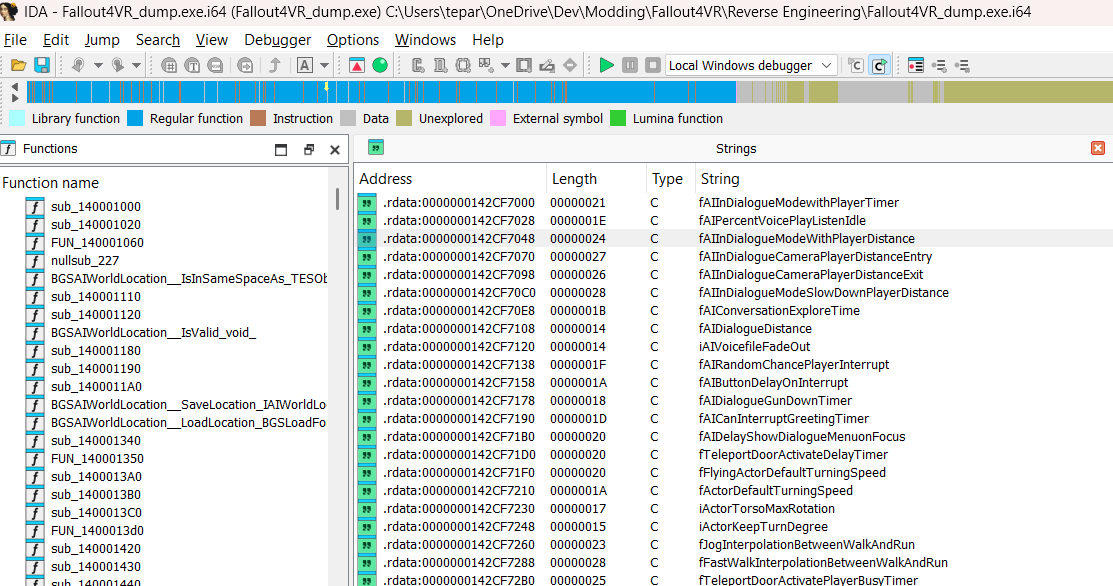
There it is, fAIInDialogueModeWithPlayerDistance at .rdata:0000000142CF7048, sitting in a run of sibling settings: fAIInDialogueModewithPlayerTimer, fAIInDialogueCameraPlayerDistanceEntry, fAIInDialogueModeSlowDownPlayerDistance. Neighbouring strings being related is a good sign you’ve landed in the right table rather than on a random match.
Step 2: Follow the String to Its Owner
Double-clicking the string jumps the view to its location. Now right-click and select “Jump to xref to operand” (or press X) to find who references it:
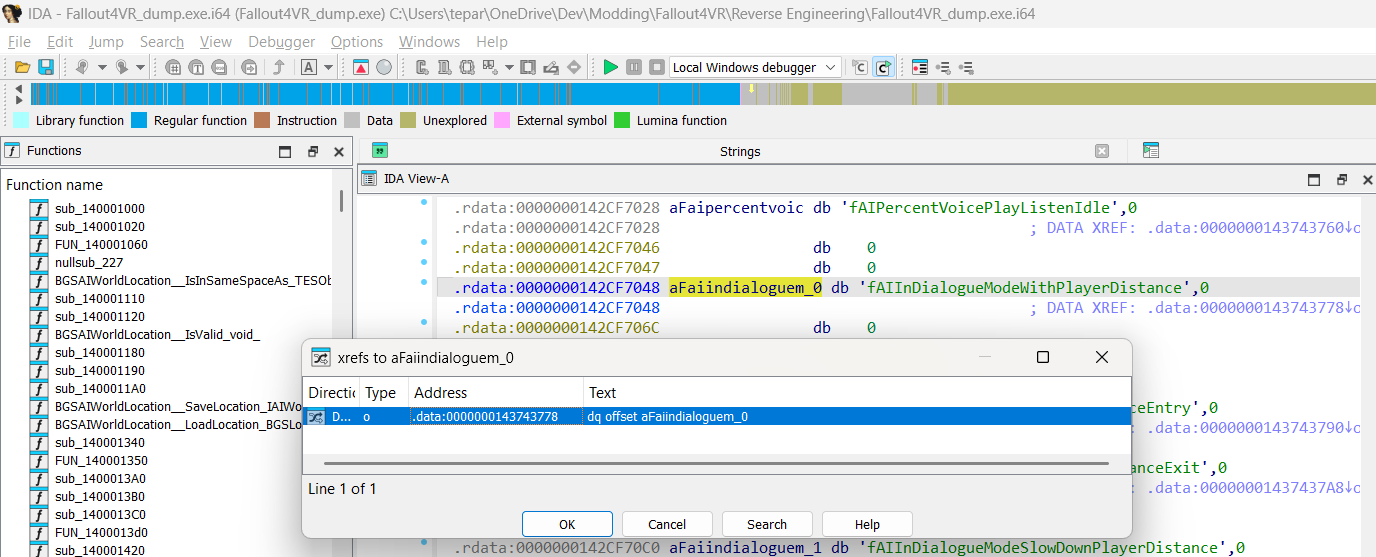
Note the result: “Line 1 of 1”, and it’s a .data reference (dq offset aFaiindialoguem_0 at .data:0000000143743778), not code. No function loads this string directly.
That is exactly what you want to see. It means the string isn’t used ad-hoc; it’s a field of a structure. Following it lands us in the game’s settings table:
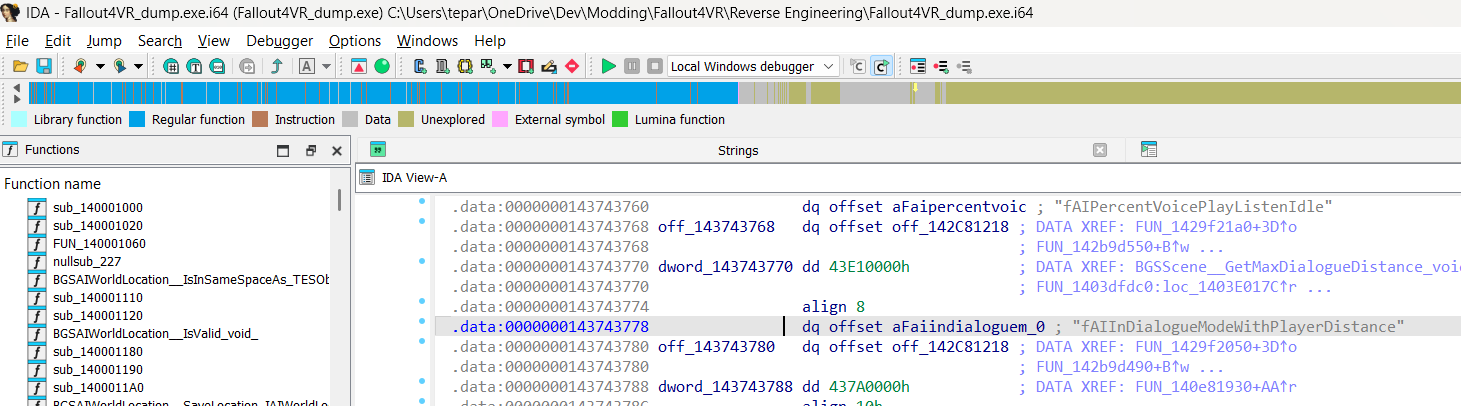
Now look at the shape of it. Ignoring the string we came in on, the entries repeat with a fixed stride of 0x18:
.data:0000000143743768 off_143743768 dq offset off_142C81218 ; +00 vtable.data:0000000143743770 dword_143743770 dd 43E10000h ; +08 value.data:0000000143743774 align 8 ; padding.data:0000000143743778 dq offset aFaiindialoguem_0 ; +10 "fAIInDialogueModeWithPlayerDistance".data:0000000143743780 off_143743780 dq offset off_142C81218 ; +00 next record...
Each record is a vtable pointer, a value, and a name pointer, and the next record starts 0x18 bytes later (0x768 → 0x780 → 0x798 → 0x7B0). If you check this against CommonLibF4, it matches the reversed Setting class exactly:
class Setting
{
public:
    virtual ~Setting();       // 00
    // members
    SETTING_VALUE _value;     // 08
    const char*   _key;       // 10
};
static_assert(sizeof(Setting) == 0x18);
Worth a footnote: 43E10000h is 450.0, not the vanilla 250.0 from the xEdit screenshot. The engine initializes these Setting objects with Bethesda’s defaults and then overwrites the value in place as it loads the GMST records, so a process dump shows whatever the load order last wrote, in this case “Realistic Conversations”. Code is identical in a dump, but don’t read a mutable global out of one and assume it’s a shipped default.
Before moving on, rename the constant with N. I used gs_fAIInDialogueModeWithPlayerDistance. It costs three seconds and it means every place that reads it will be self-documenting in the decompiled code instead of showing dword_143743770.
Step 3: Find Who Reads the Value
Press X on the renamed constant:
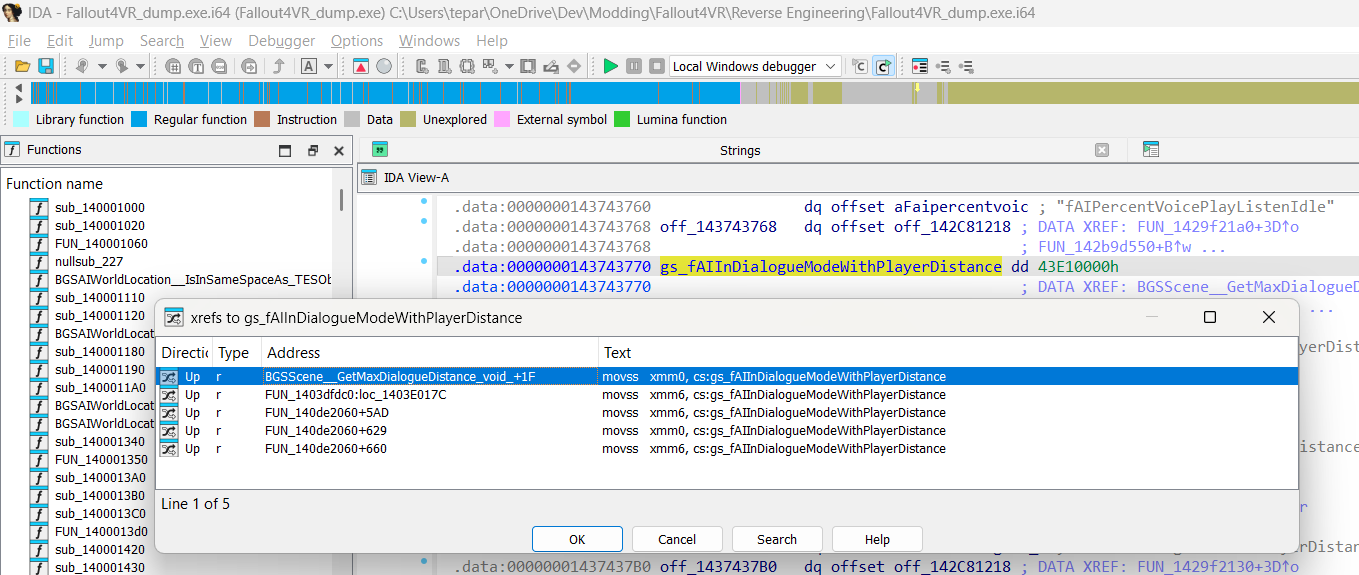
Five references, and the details matter:
| Address | Type | Instruction |
|---|---|---|
BGSScene__GetMaxDialogueDistance_void_+1F | r | movss xmm0, cs:gs_fAIInDialogueModeWithPlayerDistance |
FUN_1403dfdc0:loc_1403E017C | r | movss xmm6, ... |
FUN_140de2060+5AD | r | movss xmm0, ... |
FUN_140de2060+629 | r | movss xmm6, ... |
FUN_140de2060+660 | r | movss xmm6, ... |
All five are reads (r), never writes: the game reads this setting in three distinct functions and never modifies it at runtime. The first one is already named, and its name could not be more on the nose. That’s where we go.
Step 4: Read the Function
By default IDA shows only assembly, which isn’t the easiest to read. Generate the pseudocode with View > Open subviews > Generate Pseudocode or F5. I suggest putting the windows side by side, so you can check the decompiler’s guesses against the instructions it produced them from:
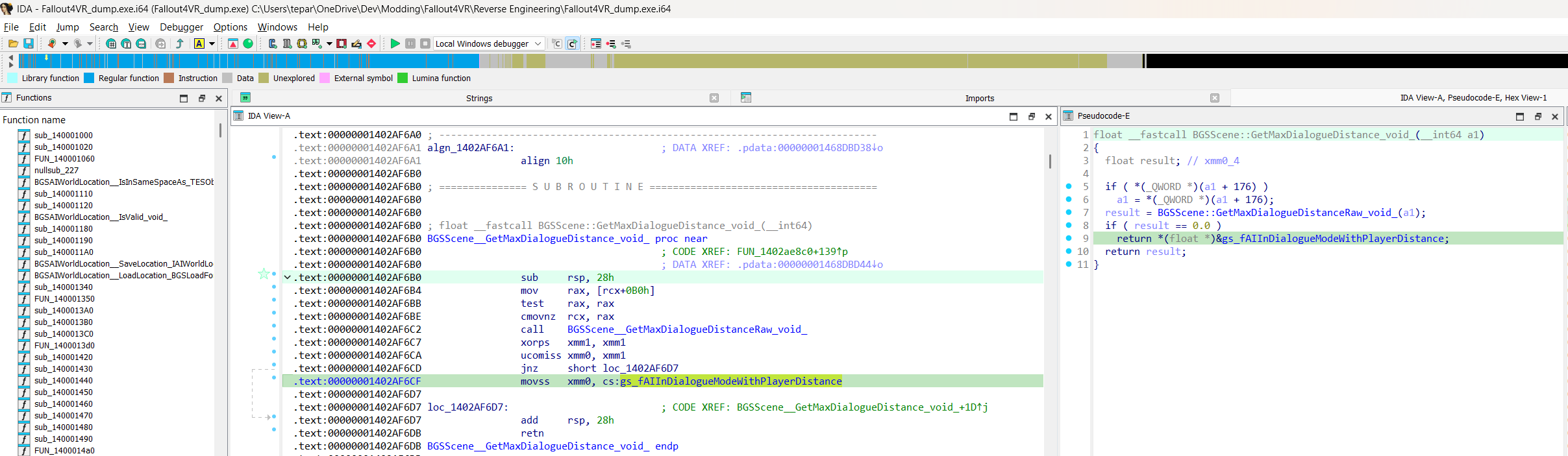
The whole function is eleven lines of pseudocode and about 40 bytes of machine code:
float __fastcall BGSScene::GetMaxDialogueDistance(__int64 a1)
{
  float result; // xmm0_4

  if ( *(_QWORD *)(a1 + 176) )
    a1 = *(_QWORD *)(a1 + 176);
  result = BGSScene::GetMaxDialogueDistanceRaw(a1);
  if ( result == 0.0 )
    return *(float *)&gs_fAIInDialogueModeWithPlayerDistance;
  return result;
}
And there’s my answer. The game setting is only a fallback. A BGSScene is asked for its own maximum dialogue distance first, and the global setting is used only when the scene returns 0.0. That is why changing fAIInDialogueModeWithPlayerDistance closed some dialogues and did nothing at all for others: the stubborn ones are scenes carrying their own non-zero distance, and they never consult the setting I was changing.
The a1 + 176 (0xB0) hop at the top is worth noticing too: if the scene has another object at that offset, the game asks that one instead. Same pattern repeats later, so it’s clearly the canonical “resolve to the real scene” step.
NOTE: It’s worth checking offsets like this against CommonLibF4, which has
BGSScenefully reversed for flat Fallout 4 and listsBGSScene* templateSceneat0xB0. That fits what the code does here, so this is probably the scene’s template. I haven’t verified that the VR layout matches the flat one, so I’m not treating it as certain.
With that, the plan seemed obvious: hook GetMaxDialogueDistance and return a small value while the player is holding “grab”. Both ways of arriving at a distance, the scene’s own and the game-setting fallback, run through this one function, so a single hook should cover everything.
Step 5: The Other Code Path (or, Why That Didn’t Work)
To simplify the story a bit: that didn’t work.
Going back to the other usages from Step 3, FUN_140de2060 accounts for three of the five reads, and this is what it’s doing:
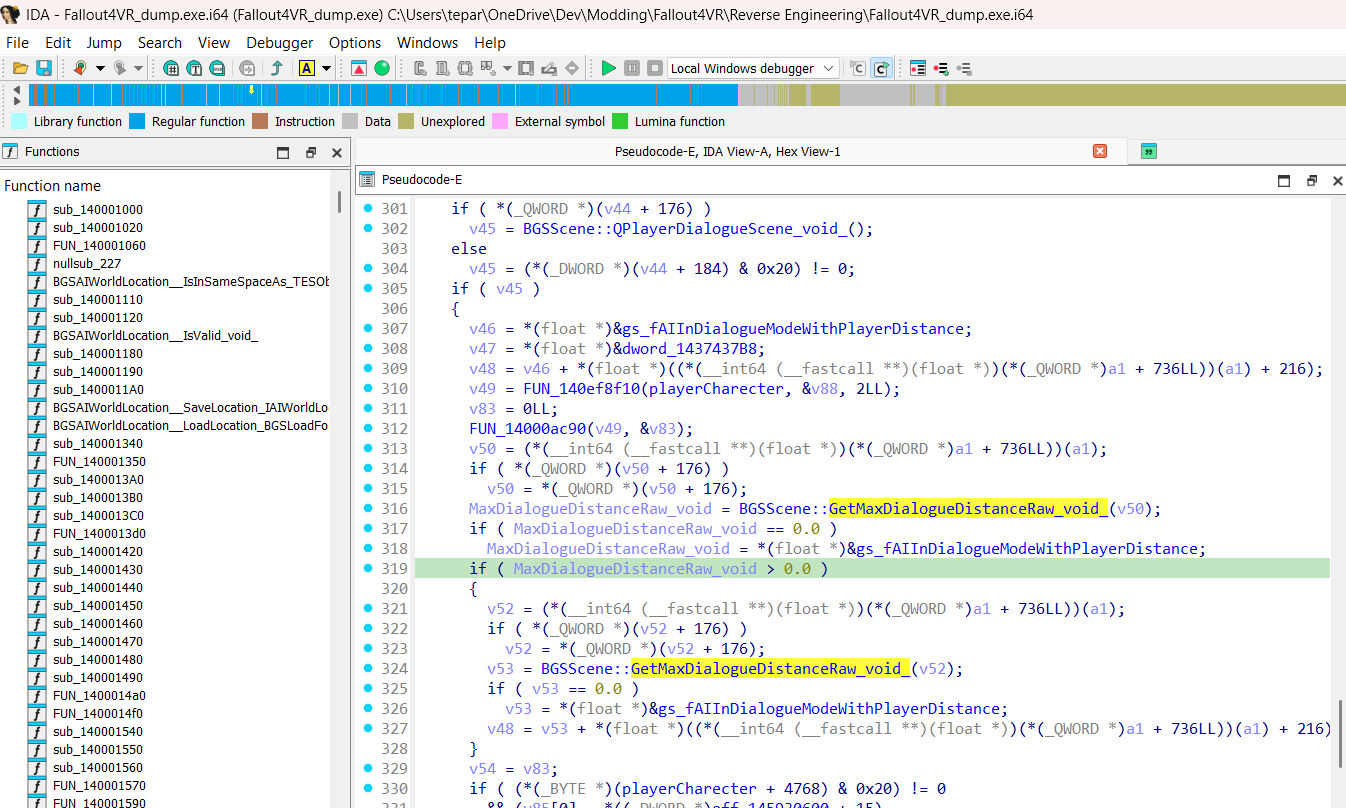
v50 = (*(__int64 (__fastcall **)(float *))(*(_QWORD *)a1 + 736LL))(a1);
if ( *(_QWORD *)(v50 + 176) )
  v50 = *(_QWORD *)(v50 + 176);
MaxDialogueDistanceRaw = BGSScene::GetMaxDialogueDistanceRaw(v50);
if ( MaxDialogueDistanceRaw == 0.0 )
  MaxDialogueDistanceRaw = *(float *)&gs_fAIInDialogueModeWithPlayerDistance;
if ( MaxDialogueDistanceRaw > 0.0 )
{
  v52 = (*(__int64 (__fastcall **)(float *))(*(_QWORD *)a1 + 736LL))(a1);
  if ( *(_QWORD *)(v52 + 176) )
    v52 = *(_QWORD *)(v52 + 176);
  v53 = BGSScene::GetMaxDialogueDistanceRaw(v52);
  if ( v53 == 0.0 )
    v53 = *(float *)&gs_fAIInDialogueModeWithPlayerDistance;
  v48 = v53 + *(float *)((*(__int64 (__fastcall **)(float *))(*(_QWORD *)a1 + 736LL))(a1) + 216);
}
Look closely: this is GetMaxDialogueDistance copy-pasted inline: the same +176 hop, the same GetMaxDialogueDistanceRaw call, the same == 0.0 fallback to the game setting. Twice, in this snippet alone. It never calls GetMaxDialogueDistance, so my hook on it was simply never reached for these dialogues.
Whether a human duplicated it or the compiler inlined it, the lesson is the same and it’s the one I keep re-learning: hooking the function with the friendly name is not the same as hooking the behavior. The named wrapper is often just one of several callers.
The fix falls right out of it. Every path (the wrapper and both inlined copies) bottoms out in the same leaf: BGSScene::GetMaxDialogueDistanceRaw. So I hook that instead. Returning a non-zero value from it wins twice over: it’s used instead of fAIInDialogueModeWithPlayerDistance, and it replaces whatever distance the scene itself would have reported.
Writing the Hook
That’s it from the RE side. The rest is standard F4SE plumbing: take the offset of GetMaxDialogueDistanceRaw straight out of IDA, branch over it with the F4SE trampoline, and return a low distance while the player is asking to leave.
To get the offset, double-click the call BGSScene__GetMaxDialogueDistanceRaw_void_ at .text:00000001402AF6C2 in the screenshot above. It lands on the function at .text:00000001402AF6E0, so subtracting the 0x140000000 image base gives 0x02AF6E0.
using GetMaxDialogueDistanceRawFunc = float (*)(RE::BGSScene* scene);

inline REL::Relocation _getMaxDialogueDistanceRaw{ REL::Offset(0x02AF6E0) };
inline GetMaxDialogueDistanceRawFunc _originalFunc = nullptr;
inline uint64_t _exitDialogRequestedTime = 0;

/**
 * Return a low distance for a short window after the player presses grip.
 * Any non-zero value here overrides both the scene's own distance and the
 * fAIInDialogueModeWithPlayerDistance fallback, on every code path.
 */
float onGetMaxDialogueDistanceRawHook(RE::BGSScene* scene)
{
    if (_exitDialogRequestedTime > 0 && nowMillis() - _exitDialogRequestedTime < 400) {
        return 25;
    }
    _exitDialogRequestedTime = 0;
    return _originalFunc(scene);
}

void hook()
{
    auto& trampoline = F4SE::GetTrampoline();
    _originalFunc = reinterpret_cast<GetMaxDialogueDistanceRawFunc>(
        trampoline.write_branch<5>(_getMaxDialogueDistanceRaw.address(), &onGetMaxDialogueDistanceRawHook));
}
The short time window rather than a plain on/off flag is deliberate: it gives the game a few frames to notice the distance and close the dialogue, and then everything falls back to the original flow on its own without anything needing to reset it.
NOTE: the code above is written in CommonLibF4 style, which is what I’d write today. XDI itself is an older mod built on the original F4SE SDK, where the same hook is an
RVA<>with a runtime-version to offset map, a byte signature to scan for as a fallback, and an Xbyak stolen-bytes trampoline. See the actual commit for that version, which also deletes the game-setting hack it replaced.
For those few hundred milliseconds the player is effectively always “too far away”, and the game closes the dialogue through its own normal path. Once the window passes the hook goes back to returning the real value, so the next conversation behaves exactly as vanilla. No UI is force-closed, no state is left dangling; the game ends the dialogue the way it always does.
Result
It works on every dialogue I’ve tried, including the stubborn scenes that ignored the game-setting version. It shipped in XDI 1.3.5-VR: grip exits an active conversation at any point, and trigger still skips the current spoken line.
Takeaways
Things I wish someone had told me before I started:
- Start from a name, not from code. A game setting string, a log message, an asset filename: anything you can search for and already understand the meaning of. Working outward from a known point beats staring at
sub_140de2060hoping for inspiration. - A string xref that lands in
.datais a gift. It means you’ve found a structure, and the field you actually want is usually a few bytes away. Match the layout against the VR fork of CommonLibF4, where a lot of the engine is already reversed and named. - If VR doesn’t have it, check the flat game. Most of the RE effort goes into flat Fallout 4 and Skyrim, so CommonLibF4 and CommonLibSSE are often where a type is actually written down. Treat what you find there as a lead rather than a fact, because VR really does diverge:
PlayerCharacterneeds an extra0x470bytes of padding in VR, andMiddleHighProcessDataanother 8 at0x268, both of which I’ve had to correct in my own fork. One changed member shifts every offset after it, so check a flat layout against what the VR code actually does before relying on it. - Rename everything, immediately.
Non a constant or function costs seconds and pays for itself the moment you read decompiled code that references it. - Read the whole xref list before picking a hook. I lost time hooking the well-named wrapper when the behavior I wanted lived in a leaf that three separate call sites reached independently. Prefer hooking the deepest common function.
- Check your assumptions against the game. Editing the setting in xEdit and watching what happened in-game told me the setting was only part of the answer long before IDA explained why.
- Use AI as a reading aid. Pasting a block of pseudocode and asking “what is this doing?” is dramatically faster than decoding x64 idioms by hand, especially when you’re starting out.
None of this is advanced. But “not advanced” was exactly what I couldn’t find when I started, so here it is.
References
- Mods and tools
- Extended Dialogue Interface (XDI): the mod this work was done on, XDI 1.3.5-VR being the version this shipped in
- The two commits: the first game-setting workaround and the
GetMaxDialogueDistanceRawhook that replaced it - Realistic Conversations Fallout 4: where I found the setting shortlist
- IDA (Hex-Rays): disassembler and decompiler used throughout
- xEdit / FO4VREdit: inspecting plugin records and game settings
- Steamless: stripping SteamStub statically, for an analyzable on-disk exe
- Scylla: dumping the running process and rebuilding its import table
- Bethesda engine internals
- CommonLibF4: the original, flat Fallout 4 library, where the reversed types live (
Setting,BGSScene, and the rest) - CommonLibF4 VR fork: the VR-capable fork, what most F4VR plugins build against
- My CommonLibF4VR fork: the above plus VR layout corrections I’ve verified while working on my own mods
- F4SE: the script extender the plugin builds on
- VR Address Library for F4SEVR (source): resolve addresses by ID on VR, for mods built against the flat Address Library
- BethesdaGhidraScripts: a free Ghidra-based alternative for importing CommonLib types and symbols into a binary
- CommonLibF4: the original, flat Fallout 4 library, where the reversed types live (
- Game settings
- Mine

